
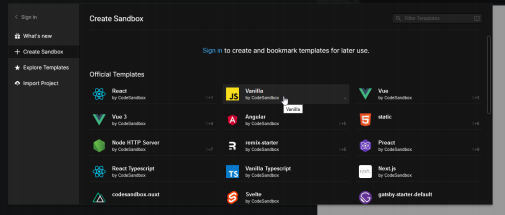
- Ava veebilehitsejas Code Sandbox sait
- Vali kollase taustaga Vanilla
Esimine ja Teine auto
import "./styles.css";

const cars = [
  {
    Name: "BMW",
    Color: "black",
    "Tinted windows": true,
    Wheel: 4,
    "Roof cargo": "medium box",
    Entertainment: ["FM/AM radio", "Bluetooth audio", "BOSE sound system"],
    Accessories: ["satnav", "heated seats", "parking sensors"],
  },
  {
    Name: "Toyota",
    Color: "blue",
    "Tinted windows": false,
    Wheel: 4,
    "Roof cargo": null,
    Entertainment: ["FM radio", "CD player", "JBL speakers"],
    Accessories: ["cruise control", "rear camera"],
  },
];

document.getElementById("app").innerHTML = `
  <div>
    <h1>Car Properties</h1>
    <table border="1" cellpadding="5" cellspacing="0">
      <tr>
        <th>Name</th>
        <th>Color</th>
        <th>Tinted Windows</th>
        <th>Wheels</th>
        <th>Roof Cargo</th>
        <th>Entertainment</th>
        <th>Accessories</th>
      </tr>
      ${cars
        .map(
          (car) => `
        <tr>
          <td>${car.Name}</td>
          <td>${car.Color}</td>
          <td>${car["Tinted windows"] ? "Yes" : "No"}</td>
          <td>${car.Wheel}</td>
          <td>${car["Roof cargo"] || "None"}</td>
          <td>${car.Entertainment.map((e) => " " + e).join(", ")}</td>
          <td>${car.Accessories.map((e) => " " + e).join(", ")}</td>
        </tr>
      `
        )
        .join("")}
    </table>
  </div>
`;

console.log(cars);
Lisasin stiile tableisse
body {<br> font-family: sans-serif;<br>}<br>table {<br> width: 100%;<br> border-collapse: collapse;<br> font-family: Arial, sans-serif;<br>}<br>th,<br>td {<br> border: 1px solid #ccc;<br> padding: 8px 12px;<br> text-align: left;<br>}<br>thead {<br> background-color: #333;<br> color: white;<br>}<br>tbody tr:nth-child(even) {<br> background-color: #f9f9f9;<br>}<br>tbody tr:hover {<br> background-color: #d1e7fd;<br>}<br>.tinted {<br> background-color: #fff2cc !important;<br>}<br>index.html
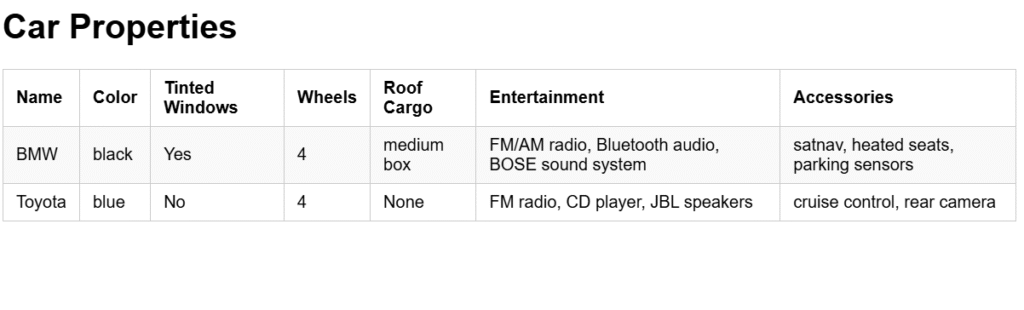
Ja seda me saame pärast kui kirjutasime kõikke
Kokkuvõtte:
Auto andmed on JSON masiivis mida pärast me kuvame html tabelina , JS abil.